9. Connect Claude Code or Cursor
Plug the AI client you already use into Forven over MCP, then let it design, backtest and validate strategies through the same gates — and watch the session live.
Forven ships a Model Context Protocol (MCP) server with 21 tools covering the whole research loop: read the workspace and the strategy template, register a strategy file, backtest, optimize, run the robustness suite, read the gate report and promote. Any MCP client can drive it — Claude Code, Claude Desktop, Cursor, Codex CLI, VS Code, Windsurf and more.
Before you start
Forven running, and an MCP-capable AI client installed. About 10 minutes. The client uses its own AI subscription; Forven's agents and AI keys aren't involved.
Open Integrations → AI Clients
Click Integrations in the sidebar. The AI Clients tab is the AI Drop Zone: connection instructions on top, live sessions below.
Expand Connect an MCP client and choose your client in Client.
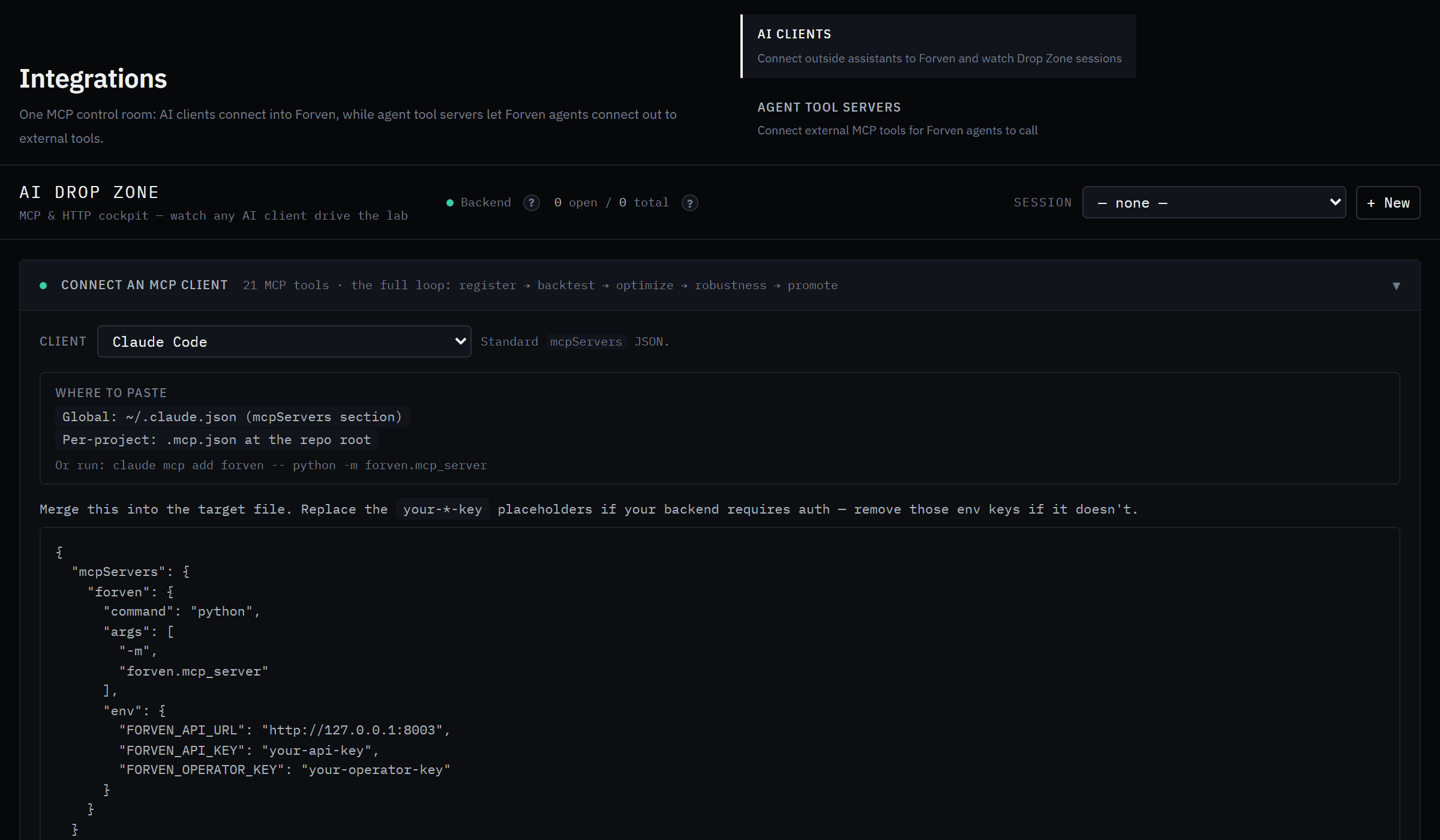 Every client gets its own snippet and the file it belongs in.
Add Forven to your client
The card tells you where the config goes and gives you the snippet to paste. For Claude Code, one command does it — run it from your Forven folder:
claude mcp add forven -- python -m forven.mcp_serverTwo details trip people up:
pythonmust be the one in Forven's virtual environment — the one that can importforven. Activate the venv first, or put the full path (…/forven/.venv/Scripts/python.exeon Windows,…/forven/.venv/bin/pythonelsewhere) in the config.- The
your-*-keyplaceholders are only needed if you exposed Forven's API beyond localhost. On a normal local install, remove those env keys.
Restart the client (or reload its MCP servers) so it picks Forven up.
Give it a task
Ask the client to work in Forven, for example:
Use the forven tools. Read the context and the strategy template first, then design a 4h trend-following strategy for ETH, backtest it, and run the robustness suite. Show me the gate report.
A good client starts with forven_get_context, writes a strategy file, registers it, and runs the evidence. A session opens automatically on its first write and tags everything it does.
Watch the session live
Back in Integrations → AI Clients, pick the session in Session. Active Session shows the strategies it registered and every gauntlet run, and Recent Activity shows the latest intake and runs across all clients. The strategies also appear in The Forge with an AI Drop Zone chip.
The rules it plays by
- Every strategy goes through the same AST safety guard, look-ahead probe and gates as yours.
- A rejection is the system working. The client reads the gate report and fixes what failed; it can't skip a gate.
- It can promote a strategy to paper once every gate is green. Going live always needs you — a typed GO LIVE in the app.
No MCP? Use HTTP
The Connect over HTTP (no MCP) card gives the same tools as a REST API, a small CLI (python -m forven.agent health | list | backtest | …) and Python and TypeScript snippets. See MCP tools and the API.
Next
8. Put the agents to work
Connect a model provider, give every agent a model, and hand the agents an idea to research — then follow what they built in The Forge.
How Forven works
The local stack, the execution kernel, the brain and its agents, the strategy-creation loop, the scanner, and how one strategy travels the pipeline — all on your machine.