4. Run and read a backtest
Backtest a built-in strategy on any market with Manual Backtest, then read the result the way the gauntlet will — out-of-sample first.
Manual Backtest runs any built-in strategy — or one of yours — on any market and window, without touching the pipeline. It's the fastest way to ask "how would this have done?" This guide runs the built-in SuperTrend on BTC/USDT 1h and walks through the result.
Before you start
Market data downloaded (Get your first market data). About 10 minutes, most of it the run itself.
Pick a strategy
Click Manual Backtest in the sidebar. Under Strategy, choose Built-in and select SuperTrend. An info card says what it does and which market it was written for, and the market fields fill in from the strategy.
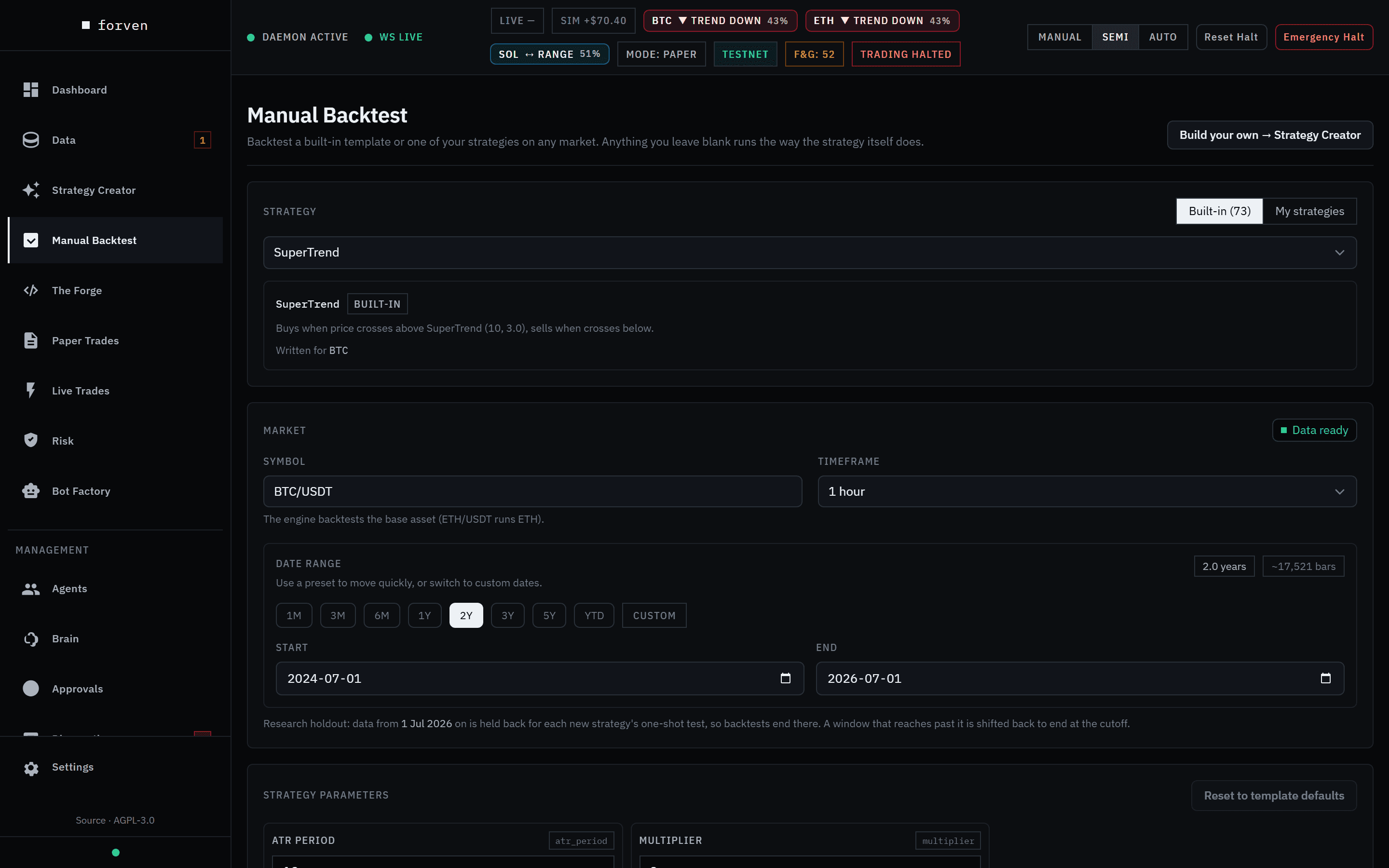 Leave a field blank and it runs the way the strategy itself does.
My strategies lists your own Forge, paper and live strategies instead.
Set the window
Click a preset — 2Y here — or type a start and end date. Notice the end date: the most recent 3–6 months are held back for each strategy's one-shot final test, which runs when the strategy applies for live. Backtests end at the holdout cutoff, and a window that reaches past it is shifted back. The note under the dates says where the cutoff is today.
Parameters, fees, slippage, leverage and sizing are optional. Anything you leave blank runs with the strategy's own settings, and the placeholders show what that is.
Run it
Click Run backtest. The run goes to a background job — you can keep editing or leave the page — and it's saved to the strategy when it finishes. Runs this session keeps a table of every run so you can compare them side by side.
Read the result — out-of-sample first
The result header states exactly which window was tested. Every metric below it is out-of-sample only: the last 30% of the window, which the strategy's settings were never tuned on.
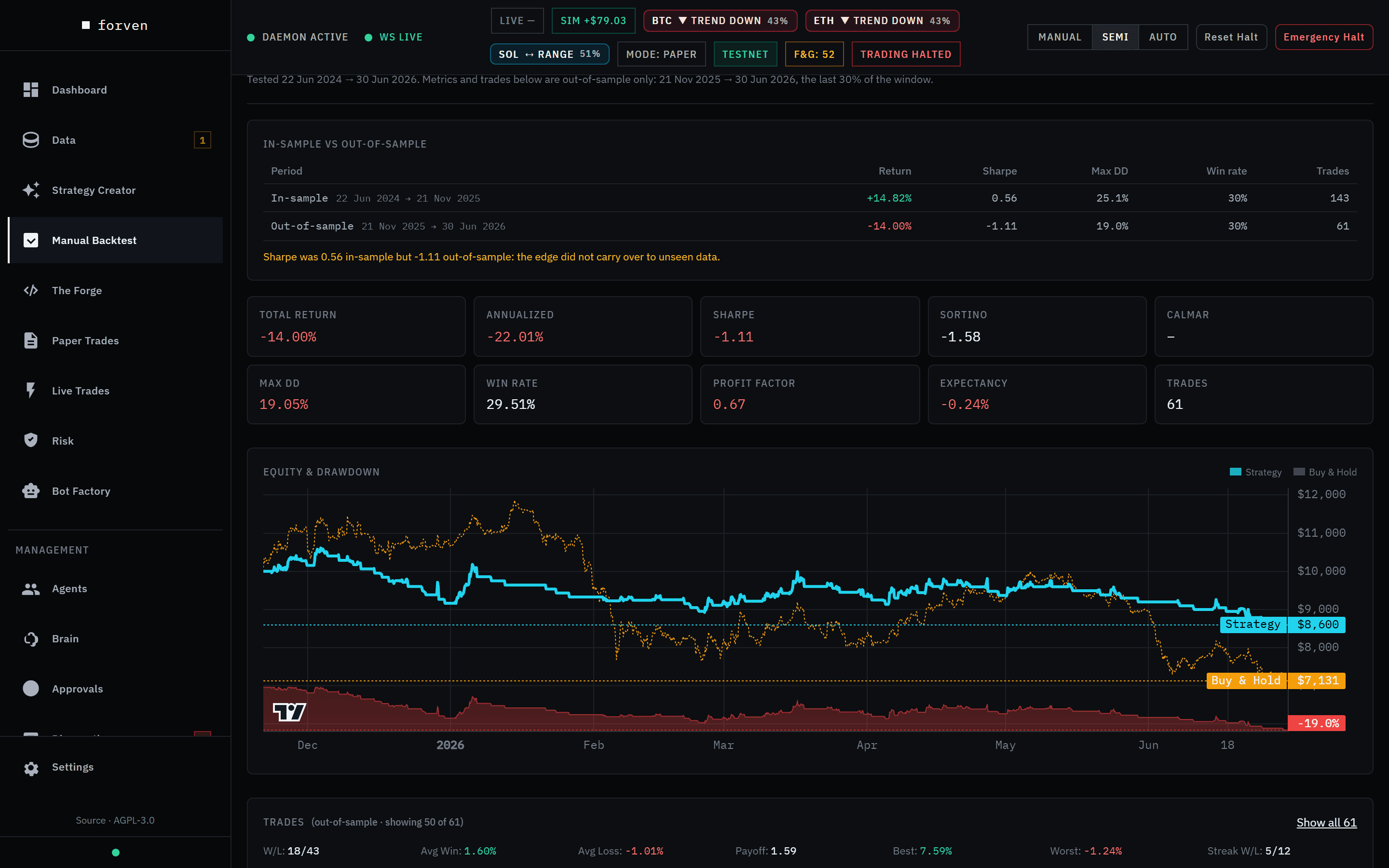 Out-of-sample, SuperTrend lost 14% — while buy-and-hold BTC lost about twice as much over the same months.
Read it in this order:
- In-sample vs out-of-sample. If the out-of-sample Sharpe is less than half the in-sample one, the app warns you — that gap is the most common sign of overfitting.
- Trades. A Sharpe built on a handful of trades is noise. Forven marks it Sharpe* when there are too few to trust.
- Max drawdown and profit factor. How much it gave back on the way, and how many dollars it made per dollar lost.
- The equity chart. Strategy against buy-and-hold over the same window. Here the strategy lost money, but about half as much as simply holding BTC through the drop — useful context, not an edge.
Go deeper, or move on
Open full report → opens the strategy page with monthly returns, every trade and drawdown periods. Adjust & re-run brings the form back with your settings.
Manual Backtest never moves a strategy through the pipeline. To test an idea for real, build it in the Strategy Creator and send it to The Forge.
The numbers to trust
| Trust | Be careful with |
|---|---|
| Out-of-sample return, Sharpe and drawdown | Anything in-sample |
| Results with dozens of trades | A great Sharpe on 10 trades |
| Results after fees, slippage and funding | Gross returns |
| Results that survive the stress test | The single best cell of a heatmap |
See Metrics for how each number is computed.
Next
3. Build a strategy
Turn an idea into entry and exit rules in the Strategy Creator, read its in-sample and out-of-sample vitals, stress-test it, and save it — no code and no AI key.
5. Run the gauntlet
Follow a strategy through The Forge — quick screen, then the robustness suite — read its verdict and the checklist for the next gate, and learn why most strategies stop here.